Admin
Admin shows the health of the Cockpit's background process: its version, how long it has been up, and buttons to stop or restart it. Below are four counts (registered projects, running agents, sessions that need you, active projects) and a table of every session with its state and its idle timer. Two switches sit at the bottom.
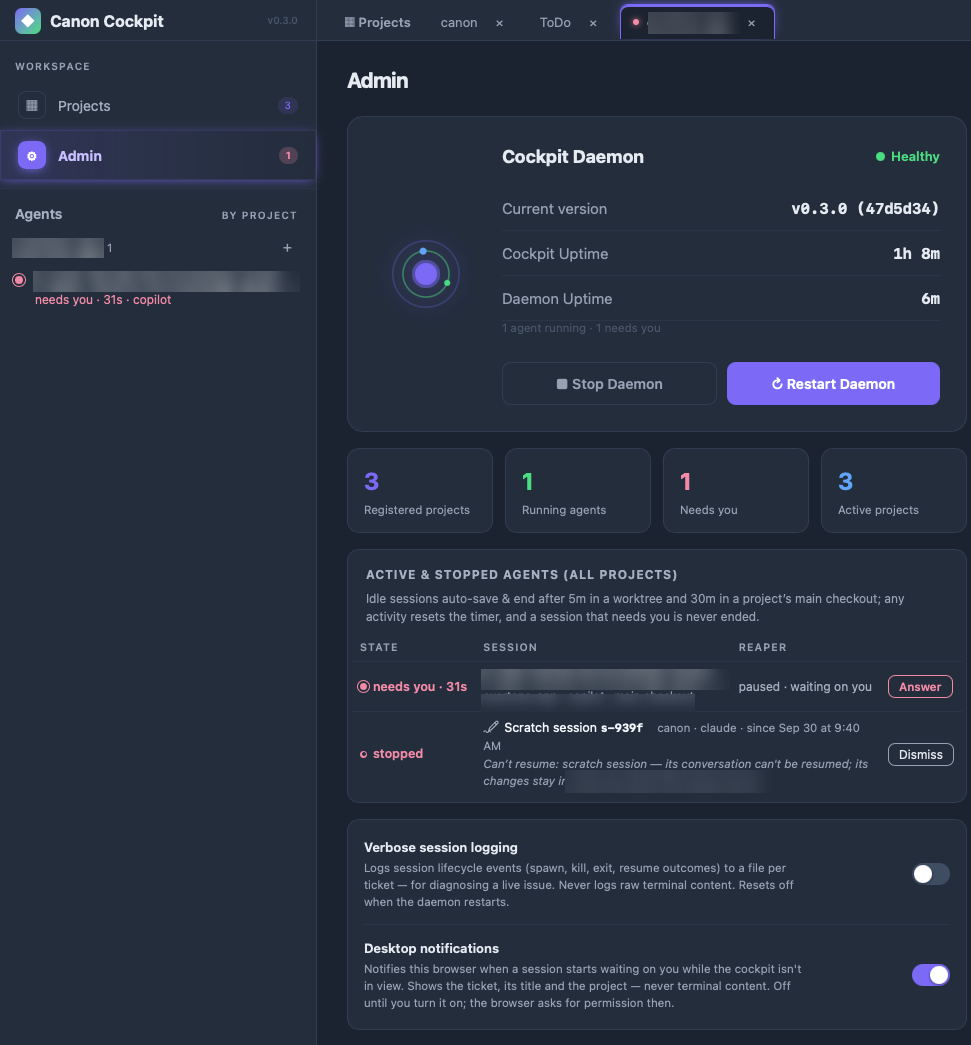
The Reaper column is the idle timer. To reap a session is to end it automatically after a quiet spell. The Cockpit saves first, the same way as Save & End (see End a session). The column shows what will happen:
- auto-save & end in 29m: the time left. Typing, or any output from the agent, resets it.
- paused · waiting on you: the session needs an answer or an approval, so it is never ended.
Cards and the Agents list show the same countdown in short form, as "reaps in 29m".
- Verbose session logging writes session events (spawn, kill, exit and resume results) to a file per ticket, to help diagnose a live problem. It never logs raw terminal content, and it switches itself off when the process restarts.
- Desktop notifications tells you when a session starts waiting on you while the Cockpit is out of view. It is off until you turn it on; see What the colours mean.
Further down, Model Tiers sets which model runs the sprint-close reviewer and evaluator for every project. See Model tiers.
Stopping or restarting the process ends live sessions, so Save & End them first if you want to keep their state. canon stop and canon restart do the same from a terminal; see CLI.
How long a quiet session lasts
A session that is not waiting on you is ended automatically after a quiet spell, and the time differs by where it runs:
| Where the session runs | Ended after |
|---|---|
| A worktree | 5 minutes |
| The project's own folder (the main checkout) | 30 minutes |
Any activity resets the timer: your typing, or any output from the agent. A session that is waiting on you for an answer or an approval is never ended. The same countdown shows on the board card and in the Agents list. See Agents and sessions and Working in worktrees.