Registering skills
Registering a skill in a project is how canon's workflow reaches that project. Two skills cover most projects: sprint, the workflow, and efficiency, the standards your agent reads in every session.
Register from the card
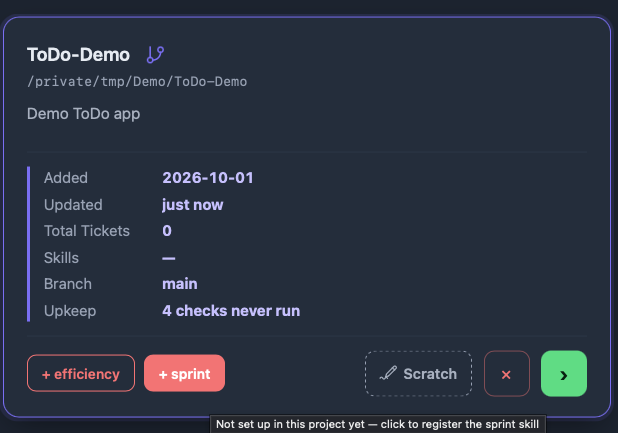
On a project's card, click + sprint and + efficiency. Hover a button to see what it does. Once a skill is registered its button goes, and the Skills row lists it. It is safe to run again.
Prefer the terminal?
From the project folder, run:
skills.sh add sprintskills.sh add efficiencyWhat sprint adds
AGENTS.mdgets a table of the active canon skills and a short Model Tiers note. Codex and Pi read this file.CLAUDE.mdgets one line,@AGENTS.md, so Claude Code reads the same registration. If you already have aCLAUDE.mdwithout that line, canon asks before adding it.- Links into your canon folder:
.claude/skills,.claude/agentsand.agents/skills. The skills are not copied, so updating canon updates every project at its next session. These links are local, so canon adds them to.gitignore; never commit them. - Permission rules in
.claude/settings.json: one allows canon's review-run logger (subagent-log.sh), and a few deny system-wide installers (brew install,apt install,apt-get install,choco install,winget install), so a close gate cannot install software on your machine. Project-levelnpmandpipstay allowed.skills.sh addasks before adding them. - A git pre-commit hook, in a project that uses git. It does not overwrite a pre-commit hook canon did not write.
PROMOTED.mdand an@PROMOTED.mdline inAGENTS.md, the place learnings are promoted to; see Learnings..tickets/, for the tickets.DECISIONS.mdandHANDOFF.mdare created when the first sprint starts.
sprint brings its helper skills with it (wrapup, learnings-sweep and promote-learnings), so most projects need nothing else.
What efficiency adds
efficiency adds an @ import of the standards file to the top of AGENTS.md, and a row in the skills table. That file holds coding rules, the format for review feedback, git conventions, triggers for what the agent should do when it sees a problem, and token-saving habits.
Turn on git after registering
A folder registered before git was on has no pre-commit hook yet, and its skill links are not in .gitignore. Turning on git from the card's git icon does not change that. After turning git on, run this in the project:
skills.sh refreshIt installs the pre-commit hook and adds the links to .gitignore. Until then, a commit could pick up the skill links.
Commit your tickets
In a project that uses canon, track .tickets/ in git. Your acceptance criteria, plan and summary are the record of each sprint, and two things need them committed: headless CI grading reads a ticket's acceptance.md from the checked-out repo, and a new worktree only carries committed files (see Working in worktrees).
Canon also writes a few per-machine files under .tickets/ that must not be committed: .tickets/ACTIVE and the .cockpit-* files inside ticket folders. It adds a .tickets/.gitignore covering them. Commit that file. Tracking tickets in git has the full story.
Check, repair and remove
skills.sh status                # registered skills and hook health
skills.sh list                  # the skills you can register
skills.sh refresh <project>     # re-register and repair the links
skills.sh remove <skill>        # unregister a skill from a project
skills.sh link-worktree <path>  # link a worktree you made by hand
skills.sh uninstall             # remove the hook and the Pi extension
skills.sh uninstall cleans canon out of the project in the current folder; to remove canon itself from the machine, see Uninstall canon. remove unregisters one skill from the project in the current folder; add a folder to name another. skills.sh remove sprint takes sprint out of AGENTS.md, removes the git pre-commit hook and the reviewer and evaluator definitions, and offers to remove the subagent-log.sh permission. skills.sh remove efficiency removes its @-import and offers to remove the model-per-task note in AGENTS.md. When the last skill is gone, the project is taken off canon's list of registered projects.
After upgrading canon, refresh re-registers a project, repairs its links and removes legacy imports. A worktree the board creates is linked for you; link-worktree is only for one you made by hand.